Instructions 2/6
2. Running SkyrimCharacterHelper
Preface
SkyrimCharacterHelper remembers all of its settings and reconfigures accordingly on next start. This applies to settings of the Control area as well as to UI settings, such as
for instance the savegame display's column ordering. Another feature is the reactive UI: This means, that at a given point of time, only those UI elements are accessible which provide
any meaningful functionality. For instance, you cannot access the Launch buttons unless you have entered the savegame prefix setting (which is explained later).
2.1 Installation
2.2.1 SKSE users
Attention, SKSE users! Unlike the others, you MUST extract the contents of the SkyrimCharacterHelper folder into your Skyrim installation directory, otherwise you'll get
an "tesv.exe not found" error. Thanks to the guys at SkyrimNexus
who figured this out!
2.2.2 Others
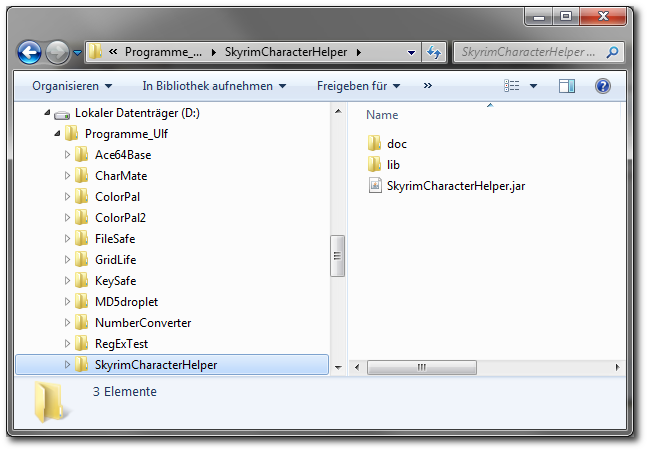
Installation is fairly easy: The deliverable zip-file contains a folder named SkyrimCharacterHelper. Extract this folder to any harddrive location. In this folder, you will find the
jar-file SkyrimCharacterHelper.jar. The documentation can be found in the subfolder docs, while libs houses used libraries.
Please DO NOT spread the contents of the folder SkyrimCharacterHelper when extracting, you have to preserve the folder structure!
To clarify this, the following screenshot shows the directory structure on my harddisk after extracting the deliverable to the folder D:\Programme_Ulf:
2.2 Startup and exit
SkyrimCharacterHelper can be started by double-clicking on its jar-file. You may also want to create a shortcut to SkyrimCharacterHelper.jar and change the shortcut command to javaw -jar <Path>\SkyrimCharacterHelper.jar to get rid of a start-shell window.
On start, SkyrimCharacterHelper tries loading its properties from the local file settings.prs, on exit it stores its settings there. The values are interpreted and used for continuing the startup procedure, which is as
follows:
1. Scan Skyrim's savegame folder (if defined)
2. Scan backup folder for savegames (if defined and configured)
3. Revalidate UI in respect with the information gathered before
2.3 Fresh start
In case SkyrimCharacterHelper cannot find its properties file, it assumes a fresh starts and pre-defines some settings. It will set your Skyrim launch target to Skyrim's standard launcher executable, the path
is gathered from your registry. Furthermore, SkyrimCharacterHelper sets up a savegame prefix based on Skyrim's localization files (the savegame prefix is explained on page 3). An
information requester will inform you about these actions.
When running SkyrimCharacterHelper for the first time, you usually do the following:
1. Define Skyrim's savegame folder
2. Define your backup savegame folder
3. Check whether the savegame prefix is valid
4. Define the settings such as file mode, launch mode etc.
2.4 During runtime
SkyrimCharacterHelper works in two different modes of operation: After start, it works in normal mode, listening to user interactions and performing the requested operations. As
soon as you launch Skyrim, the tool switches to monitoring mode, in which it remains until you either manually interrupt by clicking the Cancel button, or Skyrim
has terminated.
In monitoring mode, SkyrimCharacterHelper periodically scans the process list for any Skrim-related processes. If none are found, it assumes that Skyrim has
exited and returns to normal mode by bringing up its window. As long as Skyrim-related processes are found while being in monitoring mode, SkyrimCharacterHelper
checks whether Skyrim creates any autosaves or quicksaves, in order to converting them to regular savegames (if this setting was activated by the user).
The current mode of operation is visualized in the lower right corner of the window: Whenever the monitoring label changes its color to green, the tool is in
monitoring mode, otherwise it is in normal mode.


As long as it is working in monitoring mode, SkyrimCharacterHelper will show every update caused by Skyrim's file operations which influences the currently
displayed savegame list and character list, but it will not accept any user interaction except pressing the Cancel button.